Uploading Documents
The more of your work ThAD has access to, the more useful it becomes. Adding new documents is simple — just email them in. ThAD handles the rest: extracting the text, figuring out what kind of document it is, and making it searchable.
Uploads go by email, not chat
ThAD does not accept file uploads through the chat window. All documents are uploaded by email.
How to upload
- Email your document to upload@inbound.thadapp.com.
- Send from your registered email address.
- Attach one document per email.
- Include a sentence about what kind of document it is (e.g. "Here's my latest sermon"). ThAD will guess the type if you don't, but telling it is more reliable.
- You'll receive a confirmation email within a few minutes with the extracted metadata.
Supported formats
- Microsoft Word (
.docx) - Apple Pages (
.pages) - PDF (
.pdf) - Plain text (
.txt)
Uploading from Google Docs
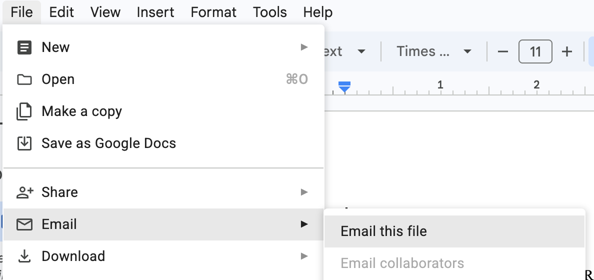
You can email a Google Doc straight to ThAD — no downloading required:
-
In Google Docs: File → Email → Email this file.
-
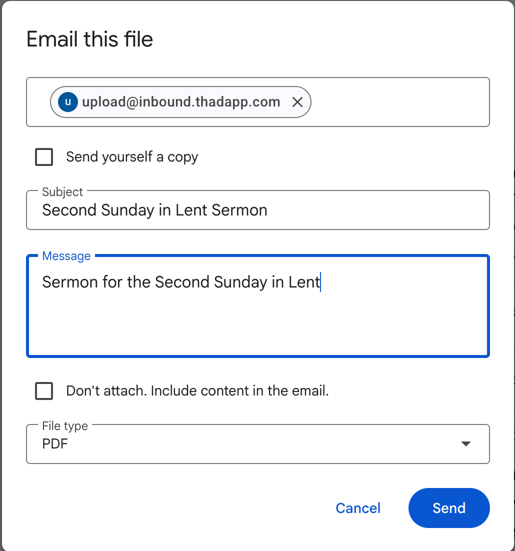
Address it to upload@inbound.thadapp.com, sent from your registered email address.
-
Leave the format at the default (PDF) — both PDF and Word work fine. Then click Send.
Tips for successful uploads
- Use descriptive file names — they help with organization.
- Tell ThAD what the document is in the email body so it doesn't have to guess the type.
- If you don't receive a confirmation, check that you sent from your registered email address.
- Documents are automatically classified by type (sermon, article, pastoral letter, etc.) and indexed for search.